Service Bundles
Group multiple services into a single bookable bundle package
Service Bundles let you package multiple services together into a single offering. Instead of booking each service individually, clients can book the entire bundle at once — and you can price the bundle differently from the sum of its parts.
Click Catalog → Bundles to get started.
Why use bundles?
Bundles are useful when clients regularly book the same combination of services. For example:
- "The Full Works" — Haircut + Beard Trim + Facial
- "Bridal Package" — Hair styling + Makeup + Manicure
- "Gentleman's Refresh" — Haircut + Hot Towel Shave
Instead of your staff manually adding three services every time, they just select the bundle — all services are added to the appointment at once.
Creating a bundle
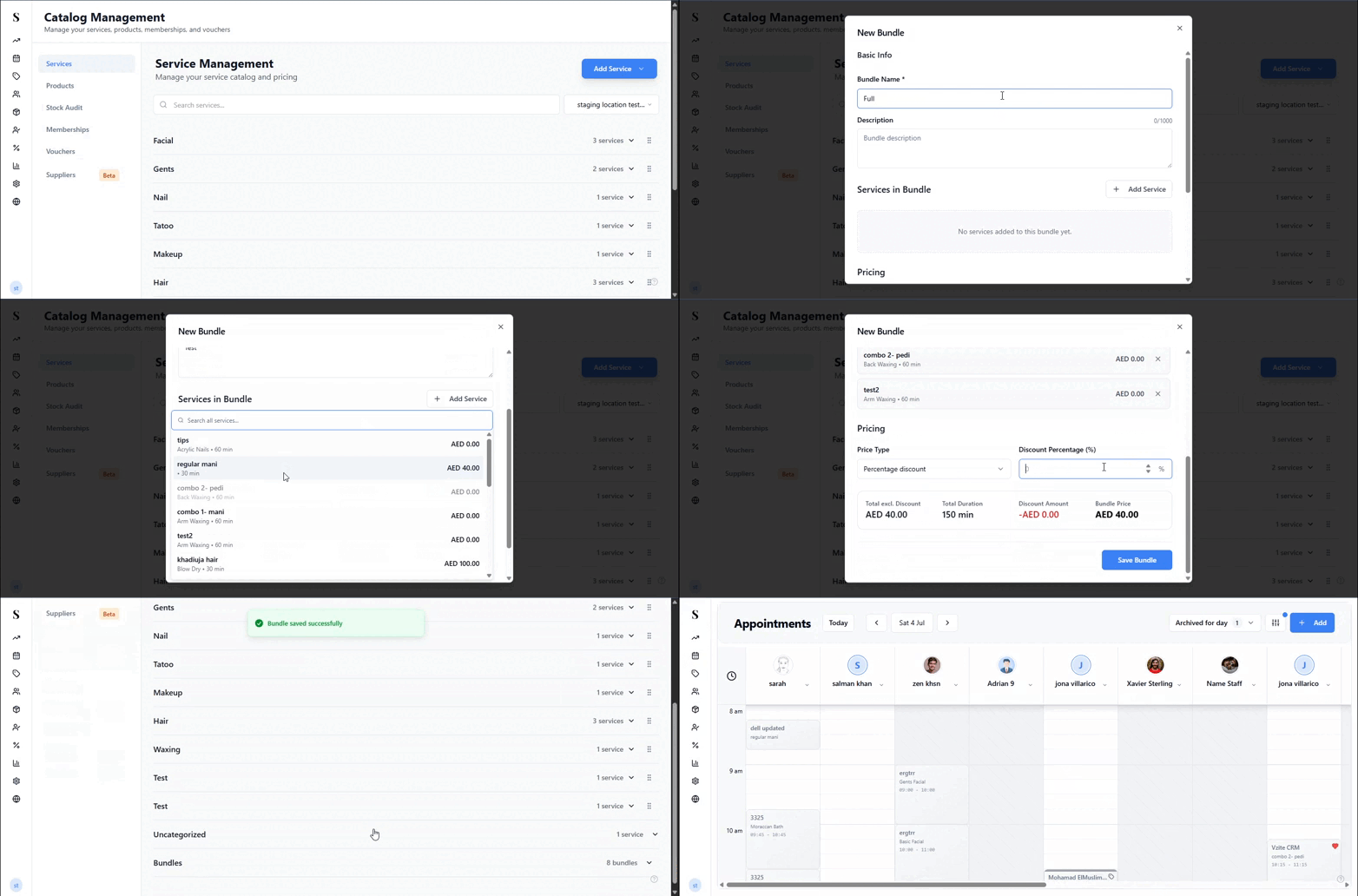
Go to Catalog → Bundles and click Add Bundle.
Give the bundle a name that clients and staff will recognise.
Select the services to include — you can add as many as you need.
Set the bundle price. This can be lower than the combined total of individual services to offer a package discount.
Optionally set the total duration — this is calculated automatically from the included services, but you can override it if, for example, services overlap.
Make sure the status is set to Active.
Click Save.
Editing or removing a bundle
Click the Edit icon on any bundle to:
- Add or remove services
- Change the bundle price or duration
- Rename the bundle
- Toggle it to Inactive if you want to temporarily stop offering it
To permanently remove a bundle, use the Delete option.
Deleting a bundle does not affect any past appointments that used it — those appointments keep their service records intact.
Using a bundle in an appointment
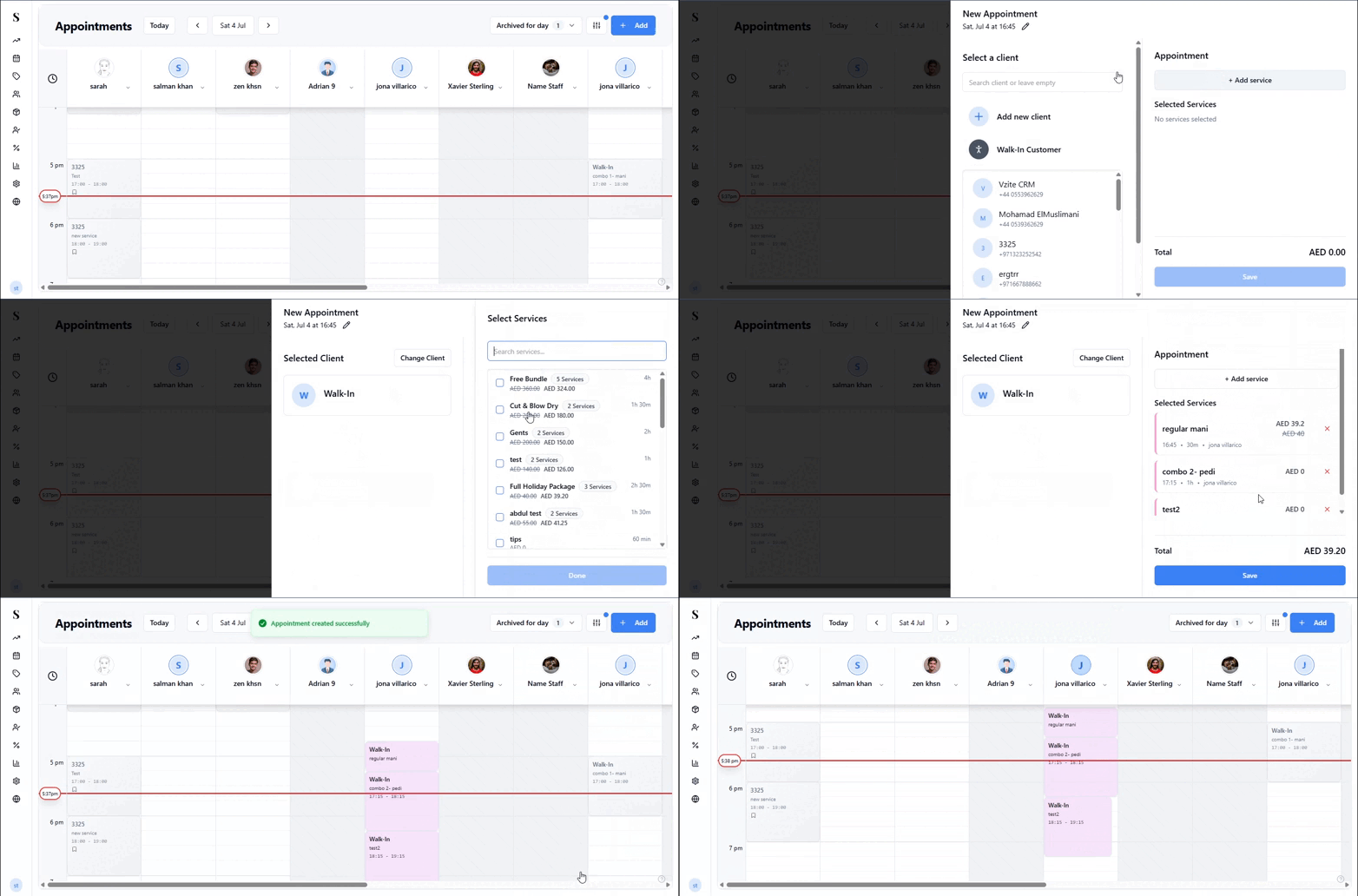
Bundles appear alongside individual services when booking an appointment. When you select a bundle:
- All included services are added to the appointment at once
- Each service shows individually on the calendar and the checkout
- The total price reflects the bundle price, not the sum of individual services
- Staff assignments and durations work the same as for individual services
Bundle pricing
The bundle price is independent of individual service prices. This means:
- You can offer a discount — e.g., three services that would cost AED 300 individually, bundled at AED 250
- Price changes to individual services don't affect the bundle — you control the bundle price separately
- The bundle price is what appears at checkout
Quick reference
| What do you want to do? | How? |
|---|---|
| Create a new bundle | Go to Catalog → Bundles and click Add Bundle |
| Change a bundle's price | Edit the bundle and update the price |
| Add or remove services from a bundle | Edit the bundle and adjust the service selection |
| Stop offering a bundle temporarily | Edit the bundle and toggle to Inactive |
| Delete a bundle permanently | Use the Delete option on the bundle |
| Use a bundle when booking | Select the bundle like any other service during booking |